Cuts by what people say
YouCut this interview to 60 seconds. Keep the best takes.
AI helperI read 214 sentences and kept 9. I dropped 3 retakes and 2 “um”s, then placed 6 cuts. It runs 58 seconds.
You tell an AI helper what you want. It does the editing for you. You stay in charge.
Download and use it for freeWindows · Premiere Pro 26.3+ (tested on 27.1 Beta) · Python 3.10+ · Claude Code or Codex · UXP Developer Tool · What you need
Do you spend a lot of your days editing video? Most of those hours go into cutting flubbed takes, tightening pauses and dropping B-roll in the right spot. None of that is an editorial decision. It just takes time. So I built a bridge that hands that part to AI.
It cuts from what was said, then listens back to every cut and checks a few frames. A clipped word or a cut that is too tight gets fixed before it moves on.
It reads what was said, how your timeline is laid out and what is on screen. So it cuts where the story needs it, not just where the silences are.
It puts clips and graphics on the timeline itself, as part of the same edit, not as a separate job at the end.
An AI that edits without checking just gives you a new pile of mistakes. This one checks after every change.
Say what you want, like “cut the bad takes”.
Claude Code or Codex reads what people said and plans each cut.
Runs on your PC and passes each step to Premiere Pro.
Makes the edit on your timeline while you watch.
Then it checks its work. It listens to every cut and looks at a few frames. If something is off, it goes back and fixes it.
Example chats. Scroll inside the phone to see the next one.
YouCut this interview to 60 seconds. Keep the best takes.
AI helperI read 214 sentences and kept 9. I dropped 3 retakes and 2 “um”s, then placed 6 cuts. It runs 58 seconds.
YouPut the city shots over the part about rent, and the chart at 0:42.
AI helperDone: 4 city shots and the chart, each filled to the frame. Nothing under them got covered.
YouDo the cuts sound right?
AI helperI listened to all 12. One cut clipped the word “because”, so I gave it a little more room. The other 11 are clean.
YouSwap in the Chinese titles.
AI helperSwapped 11 clips. Your fades, sizes and effects came along. I checked each one.
YouWhat will you change?
AI helper6 cuts, 2 clips moved, 1 marker. Say go and I’ll do it. You can undo any of it with Ctrl+Z.
YouDo my videos get uploaded?
AI helperNo. Your video files stay on your PC. I only see the words people said and a few still frames.
Every line of code is on GitHub under the MIT license. Read it, change it, share it.
Click the download button. A zip file lands in your Downloads folder. Right-click it and choose Extract All.
In the extracted folder, double-click 1 Install Premiere Agent Bridge. A window checks your computer, helps you fix anything that is missing, and puts a Premiere Agent Bridge shortcut on your desktop.
Double-click the Premiere Agent Bridge shortcut, then open Premiere Pro and its Agent Bridge panel (Window → UXP Plugins → Agent Bridge). The panel tells you what to say to your AI helper.
Version 0.7.1. What’s new in each version, in plain words. Want an older version? See all versions.
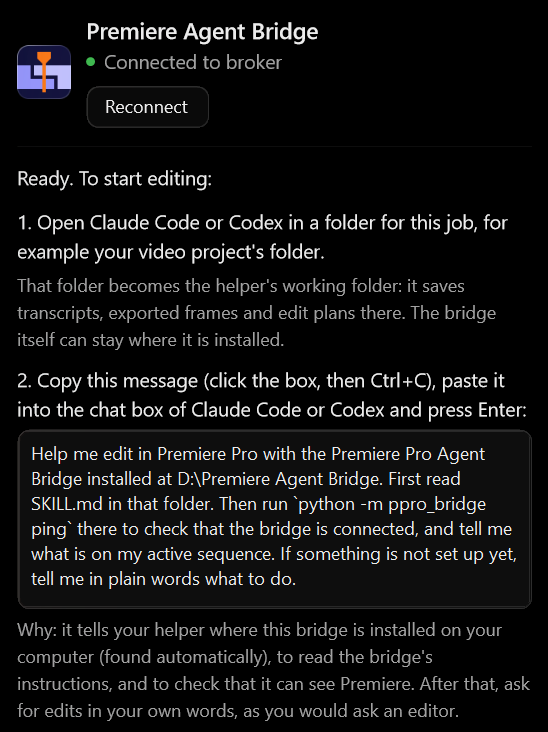
The setup window also helps you turn on developer mode, once in UXP Developer Tool and once in Premiere (Settings → Plugins). Optional: FFmpeg, for scaling clips and the listening check, and faster-whisper, for transcribing on your PC. Step by step: the docs.
Yes. It is open source under the MIT license. You can use it, change it and share it.
No. It is an independent project. It uses Adobe’s official way of adding plugins to Premiere Pro.
It checks before it changes anything, and every change can be undone with Ctrl+Z. Still, try it on a copy of your project first.
It looks at three things: the words people said, how your timeline is laid out, and how the edit really sounds and looks. It listens to the audio and checks a few still frames.
It is built on UXP, Adobe’s current way of adding plugins to Premiere Pro, not on the older CEP system that Adobe plans to retire. When a new Premiere version changes something, the setup window and the bridge tell you.
Not yet. Right now it only works on Windows.
Claude Code and Codex. Any AI helper that can run commands on your PC can use it too.
Most of the time the bridge window is closed: click Start bridge in the panel, or double-click the Premiere Agent Bridge shortcut. If that does not help, go through the checks in the docs, in order.
Free for good. Version 0.7.1 for Windows, one 1.2 MB zip file.
Try it on a copy of a project, and tell me where it breaks.